



It is easy to send money on Zelle once both people are enrolled, but before that, you might want to be sure the person you choose to pay actually uses the service. Some people assume everyone already has Zelle because it is built into so many major banking apps, yet that is not always the case.
Just $5. Lifetime Validity

One thing to know is that Zelle partners with over a thousand financial institutions, which means most U.S. bank customers have access. If you learn which bank your recipient uses, you can quickly check the Zelle website for the list of supported banks.
When their bank appears there, that person most likely already has Zelle available inside their banking app, even if they have never opened it. This simple check can save time before you even attempt a transfer.
It also helps to notice the way Zelle reacts when you begin adding someone as a contact. When you type a name, email, or phone number into the “Add Recipient” field, Zelle sometimes autofills the rest of their details.
In several banks’ contact lists, there is also a purple “Z” that quietly tags people already using Zelle. That icon is a friendly sign that the path between your account and theirs is already open. If the purple Z does not appear, you can still send money, though the payment might remain pending until they finish registering.
You can watch what happens after you send a small test amount. When both sides are set up, the money usually lands within minutes. If the transfer sits pending for a day or more, it likely means the recipient still has to complete registration.
How To Find Someone On Zelle?
It can feel a bit uncomfortable trying to figure out whether someone already uses Zelle before you send them money, you don’t want your payment hanging in limbo, and you don’t want to surprise someone.
In several cases, you’ll be able to spot clues that suggest the person is registered, and this article will walk you through four strong ways to tell. That way, you can send with more confidence, or at least know what to ask before you hit “send.”
1. Check If Their Bank Offers Zelle Access
When someone uses Zelle, one of the foundational requirements is that their bank or credit union participates in the Zelle network. If a bank is not part of Zelle, then even if you have the recipient’s email or mobile number, the process may be delayed or require extra steps. According to Zelle’s FAQ, both sender and recipient must have an eligible checking or savings account at a U.S. bank or credit union that supports Zelle.
Now, visit Zelle’s participating institutions list (or check the bank’s site) to see whether that institution supports Zelle. If yes, that increases the likelihood that the person is enrolled.
If not, then you’ll know ahead of time that they might need to enrol first. Even if their bank supports Zelle, they might not have set it up yet.
If their bank doesn’t support Zelle, you can still send money via other means, or they may use the standalone Zelle app (though that option is increasingly deprecated).
2. Auto-suggests Name When You Add a Recipient
Inside many banks’ apps (or the Zelle interface linked to a bank), when you go to “send money” and add a new recipient by email/phone number, the system may recognise their name and autofill it, which is a strong signal that the person is already enrolled via that email/phone.
You can start typing the first and last name of the person. If their full name autofills, that is a clear sign they have already enrolled.
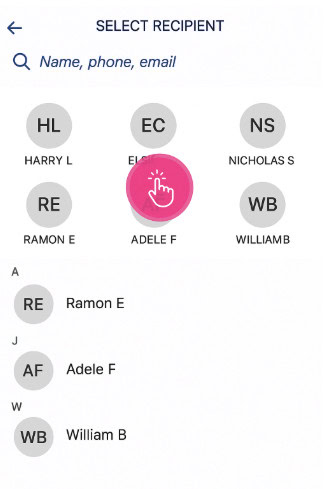
Here’s how you apply it:
- Open your bank’s Zelle-send screen.
- Click “Add recipient” and in the email/phone field, type the recipient’s info.
- Check if their name appears quickly (without full manual entry), and the system recognises that contact.
If you have to fully type their name and nothing autofills, they may not be enrolled yet, or at least not linked via that email/phone.
Autofill isn’t guaranteed even if they’re enrolled. For example, maybe they used a different email or phone number than the one you have.
3. Look For The Purple “Z” in Your Contacts
A more visible clue: in some banks’ apps, or within the standalone Zelle UI, contacts who are already using Zelle are tagged with a small purple “Z” icon next to their name.
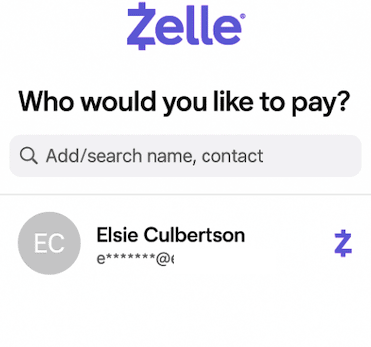
Mentioned on Zelle’s official Site:
“We’ve tagged your contacts that are already using Zelle® with a purple ‘Z’. Don’t see the purple ‘Z’ on a contact? Not a problem! You can still send them money with Zelle®.”
How you use this:
- Open your contacts list (within your bank’s app or within Zelle if applicable).
- Locate the person you want to pay.
- See whether a purple “Z” appears next to their contact entry. If yes → good sign they are enrolled.
- If no → still okay, but you may want to double-check with them.
4. Check How Quickly Transfers Are Completed
This one is a “post-send” indicator rather than a pre-send check, but still useful if you’ve already initiated payment and want to infer what’s happening. According to multiple sources, when both sender and recipient are enrolled, transfers occur “within minutes.”
If the funds remain pending or take a business day (or more) to settle, it may mean the recipient is not yet enrolled, and send a low-risk amount (if you’re comfortable) or watch your transaction after sending.
Monitor your bank’s app: did it say “Completed” quickly, or is it stuck in “Pending”? If it shows “Completed” and the recipient confirms, you know their link worked.
If you see “Pending” and/or you or the recipient gets a notification asking them to enrol, that signals they might need to complete enrollment.
How to Find Out If Someone Has a Zelle Account?
If you’ve done some preliminary checks, but you still want stronger certainty: “Does this person have an active Zelle account linked to that email or phone number?” Here are two methods that get closer to answering that question.
1. Ask the Recipient Directly
The most direct way (and often the best) is to simply ask the recipient whether they are enrolled with Zelle, and specifically whether they’ve linked the chosen email or mobile number to receive payments. If a recipient is not yet enrolled, then they’ll receive an email or text notification letting them know you’ve sent them money. If they don’t enrol within 14 days, the payment will expire and the funds will be returned.
First, contact the person and say something like: “Hey, just to confirm — are you set up on Zelle with this email/phone number so I can send you money right away?”
If yes, then great. You can proceed.
If no, then mention that they can enrol (it only takes a few minutes, linking the email/phone and bank account) so you both avoid delays.
2. Confirm Their Contact Method (Email or Phone) is Linked
Even if someone says “yes, I use Zelle,” you still want to check which email or phone number they linked because Zelle matches the payment to exactly the email or mobile number enrolled. Make sure the email address or U.S. mobile number that you provided to the sender is enrolled with Zelle®.
Ask them which email or mobile number do you use for Zelle and double-check you have the exact one they’ve enrolled (typos matter).
If you have a phone number but they enrolled a different one (or an email instead), your payment may still be sent, but the recipient may need to enroll that specific contact.
Zelle links the bank account with that exact token (email or phone). If you send to a different token, there might be a delay while they enrol that contact.
If they aren’t sure which contact is linked, you can suggest they check their bank’s Zelle settings (or the settings for their bank) under “contact info” or “Zelle settings.” Some banks show which email/phone numbers are registered.
Frequently Asked Questions:
You can visit Zelle’s official website and open the list of participating banks and credit unions. If the recipient’s bank name appears there, they already have access to Zelle through their banking app. Major banks like Chase, Wells Fargo, and Bank of America integrate Zelle directly, so no separate signup is needed. If their bank isn’t listed, they might still join using the standalone Zelle app.
Yes, Zelle identifies users by either a registered U.S. phone number or email address. If you enter either one into your bank’s Zelle transfer field and the name auto-populates, that means the person already has an active Zelle profile. If the name doesn’t appear automatically, they might not be enrolled or may use a different contact detail.
Zelle partners with more than a thousand U.S. banks and credit unions, giving most account holders instant access through their existing mobile banking apps. Major institutions like Bank of America, Chase, Wells Fargo, Citibank, Capital One, PNC Bank, Truist, and U.S. Bank all integrate Zelle directly. If someone’s bank isn’t on that list, they can still use the standalone Zelle app to link their debit card. The full directory of supported banks is available on zellepay.com.